Superfonik: Kids Learn to Read
- 3.9
- Rating
- 100.00K
- Installs
- Free
- Price
 Analysis by App-foxy
Learning to read is much easier when practice feels like play rather than another worksheet, and that is the space where Superfonik: Kids Learn to Read tries to fit. I reviewed it as an educational game for young children, with short learning activities built around early reading practice. My first impression is that it works best as a guided, repeatable part of a child’s day, not as a complete replacement for a teacher, parent, or structured reading program.
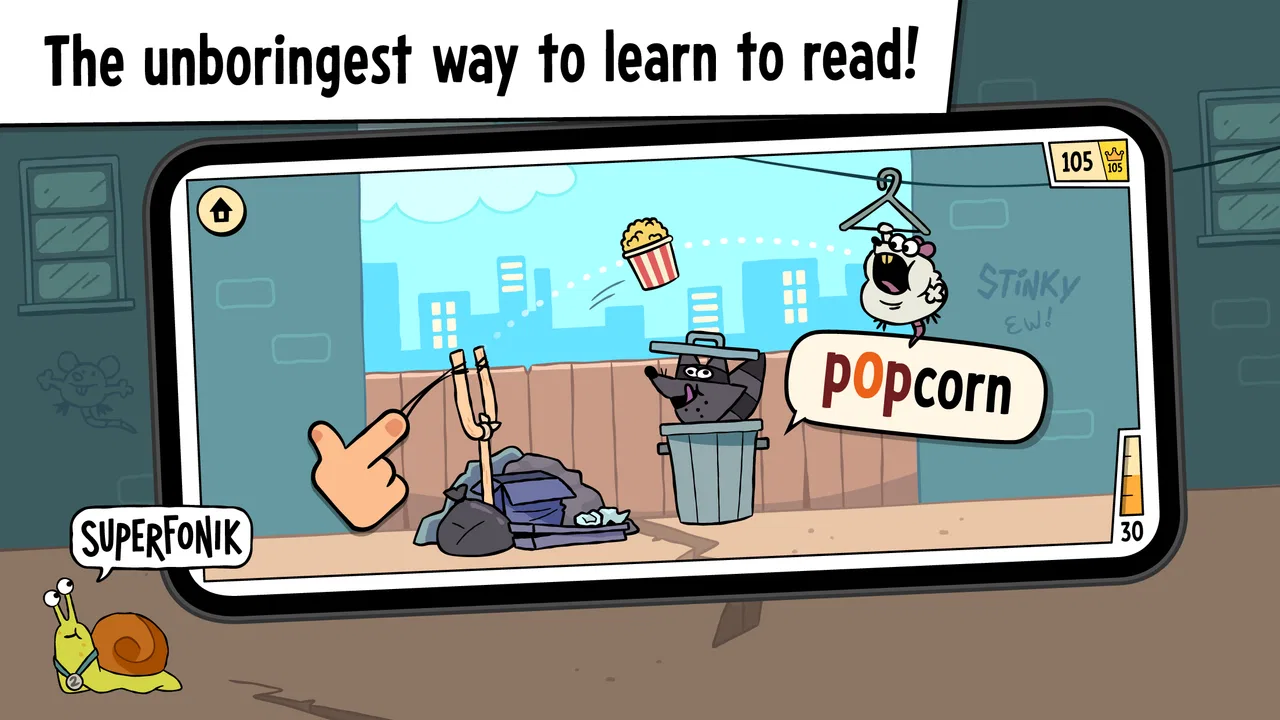
The game comes from Play Piknik and is free to install, which makes it simple to test without committing money at the start. It is aimed at everyone in terms of content rating, and it runs on devices using Android 7.0 or later. The store description is very brief, but the central idea is clear: children meet reading concepts through playful exercises rather than through a long lesson. That makes the first few sessions approachable, especially for a child who loses interest quickly when practice looks too formal.
At the time of my review, the app had an average rating of 4.1 from around 146 ratings, with over 100 thousand installs. Those figures suggest that it has found a modest audience, although they are not enough by themselves to tell me whether it will suit every child. I would judge it mainly by the child’s age, current reading ability, tolerance for repetition, and the amount of adult support available.
You May Also Like

 Blood Strike: 2.5 Anniversary
Blood Strike’s Loadouts Turn Every Drop Into a Tactical Gamble
A close look at Blood Strike’s custom loadouts: how fast access to signature weapons reshapes its battle royale rhythm, rewards preparation, and narrows the gap between fights.

 Pandora - Music & Podcasts
Pandora’s Music Is Easy to Start, but Harder to Recover
Pandora’s strength is its low-effort path from a seed to a station. Its weak spot is how much confidence it asks you to place in connection, setup, and quiet recovery.

 8 Ball Pool
 Is Built on Rivalries, Rematches, and Routine
A close look at the rivalries, rematches, shared routines, and unanswered safety questions that turn a quick pool match into a persistent mobile community.

 Samsung Music
’s Quiet Strength Is Playing What You Already Own
Its reach comes less from spectacle than from dependable access to a personal library. That simplicity is both the app’s strongest retention engine and its ceiling.

 AccuWeather: Weather Radar
AccuWeather Review: A Quick, Clear Forecast for Everyday Decisions
For everyday plans, the best forecast is the one you can understand quickly. AccuWeather makes rain timing, radar, and local conditions easy to act on, with a few trade-offs.

 Hill Climb Racing
Why Hill Climb Racing Still Turns Crashes Into One More Run
A tiny car, a bumpy hill and one more upgrade: Hill Climb Racing keeps resurfacing because its simple chaos makes every near-miss feel personal.
More From Our News Desk
View All News


How I would use it in an everyday reading routine
The most useful baseline workflow is simple: open the game when the child is alert, let them complete a small amount of practice, and stop before the activity becomes tiring. That sounds obvious, but it matters with early-learning games. A child can finish a session successfully and still remember very little if the session is too long or rushed. I prefer using Superfonik as a focused ten-minute habit, followed by a real-world reading moment such as identifying a word on a food package or finding a familiar letter in a storybook.
I would begin by sitting with the child for the first few sessions instead of handing over the device immediately. This lets me see whether the instructions are understood, whether the child is guessing from pictures, and whether a mistake causes confusion. It also gives me a chance to repeat the sound or word aloud. The game can provide the prompt, but the adult can connect that prompt to spoken language, handwriting, and books.
That combination is one of the strongest ways to use this kind of app. If a child completes a sound-matching activity, I would ask them to think of another word beginning with the same sound. If the game presents a familiar word, I would point to that word later in a printed book. These small bridges prevent the screen from becoming an isolated activity and help the child understand that reading skills apply outside the game.
Superfonik is particularly suitable for a child who needs encouragement to start practicing. The playful format lowers the emotional pressure that can come with being corrected. A child who refuses a workbook may be willing to try a game, and that first willingness can become a useful opening for broader reading practice. I would still keep expectations realistic: enjoyment is valuable, but enjoyment alone does not guarantee steady progress.
A practical home scenario would be a short session after school, before television or another preferred activity. I would let the child complete one activity, ask them to explain one answer, and then finish with a non-screen task. If the child begins tapping randomly, repeating answers without listening, or becoming upset, I would end the session rather than treating persistence as automatically productive. The goal is a reliable routine, not the highest possible amount of screen time.
What to check before handing over the device
Because the game is designed for children, I would inspect the available settings and device controls before allowing independent use. The first things worth checking are sound level, notification behavior, screen brightness, and whether the device is likely to interrupt the session with unrelated alerts. These are not glamorous details, but they strongly affect whether a child can concentrate.
Sound deserves special attention in a reading game. If spoken instructions or letter sounds are part of the activity, very low volume can turn a learning task into guessing. On the other hand, loud audio can make a child focus on the reward or animation instead of the language. I would set the volume clearly enough to hear speech and then keep the device in a quiet place rather than simply increasing the volume.
I would also make sure the child can reach the correct app without wandering into other content. On a shared tablet, a simple home-screen arrangement can reduce accidental exits. If the device offers a child-friendly screen-pinning or guided-access function, I would consider using it, but I would treat that as a device setting rather than assume it belongs to Superfonik itself. The useful habit is to remove distractions around the game, not to expect the game to control the whole device.
Parents should also look at the purchase path before a child plays alone. The game is free, but it includes in-app purchases ranging from $7.99 to $79.99 per item. That is a meaningful difference from a completely free learning tool. I would protect purchases with the device’s parental controls or require adult approval. A child should not be able to tap through a purchase screen simply because they are trying to continue an activity.
The current version is 1.6, so I would keep the installation updated through the normal app store process when an update is offered. I would not promise that an update will change the learning content or solve a particular issue, but using the current version is sensible for compatibility and stability. The minimum Android requirement of 7.0 also means that older devices may need checking before installation.
Small habits that make practice more effective
One of my favorite habits with early reading games is to make the child say the answer before tapping it. This adds a moment of retrieval instead of turning the activity into a visual reaction test. If the child selects the answer correctly, I ask them to repeat it once. If they choose incorrectly, I avoid giving the answer immediately; I repeat the instruction slowly and let them listen or look again.
Another useful habit is to keep a simple mental record of recurring trouble spots. I would notice whether the child struggles with particular sounds, confuses similar-looking letters, or loses concentration when several choices appear. I would then practice that area away from the screen using magnetic letters, paper cards, or spoken examples. The game becomes a way to reveal where support is needed rather than the only place where that support happens.
I also recommend changing the surrounding activity, not constantly changing the game itself. For example, one session can be followed by drawing a letter, another by finding that letter in a book, and another by naming objects that begin with its sound. This keeps the learning target familiar while preventing the routine from feeling identical every day. The child gets repetition without the adult having to extend the screen session.
For children who rush, I would introduce a “listen, think, tap” rhythm. The child listens to the prompt, pauses briefly, says the answer, and only then selects it. This is especially helpful when a game uses bright visual elements that encourage fast tapping. For children who are hesitant, I would reverse the emphasis: praise careful listening and attempts, then allow extra time. The same activity may need different coaching depending on the child.
These routines also help answer an important question: can the game be used independently? Sometimes, yes, once the child understands the controls and the adult has checked the purchase protections. However, I would not assume that independent play equals independent learning. A child may be able to navigate every screen while still misunderstanding the reading concept. Occasional adult check-ins are worthwhile even when the child appears comfortable.
Where it is faster than traditional practice, and where it is not
Compared with a paper worksheet, the main advantage is immediate engagement. The child does not have to wait for an adult to prepare materials, and the playful presentation can make starting easier. Compared with a standard reading book, the game may offer more repetition of a narrow skill in a short period. That is useful when a child needs several attempts before a letter or sound becomes familiar.
Those advantages come with trade-offs. A worksheet makes it easy for an adult to see exactly what the child wrote, while a game may show only whether an answer was selected. A book exposes children to sentence rhythm, illustrations, vocabulary, and meaning in context, while a focused learning game may isolate smaller pieces of reading. I would therefore use Superfonik as a supplement, especially for practice and motivation, rather than choosing it instead of shared reading.
It may also be less suitable for a child who already reads confidently and wants stories, longer passages, or more open-ended vocabulary work. In that situation, a digital library or age-appropriate reading app would probably offer more depth. Likewise, a child who dislikes touch-screen activities may gain more from phonics cards, manipulatives, or direct instruction. The educational category alone does not make every child a good match.
The free entry point is helpful for families who want to test the approach, but the in-app purchase range means the full experience may require a deliberate decision. I would not buy anything simply because a child asks to continue in the moment. First I would check whether the activities are being used thoughtfully and whether they address the child’s actual needs. A paid expansion is only worthwhile if it adds practice the child will genuinely use.
Limits that become clearer with regular use
The biggest limitation is that a game cannot observe the whole child. It may register a tap, but it cannot always tell whether the child recognized a sound, remembered a pattern, or guessed correctly. That is why I would occasionally ask the child to demonstrate the same skill without the device. If the answer disappears as soon as the screen is gone, the child needs more varied practice.
Another limit is repetition without transfer. Children can become very good at a familiar activity format while struggling with the same sound in a new word. To avoid that trap, I would use the app to introduce or reinforce a target, then test transfer casually in conversation. Asking a child to spot a letter on a sign or name an object with a particular beginning sound gives a more realistic picture of learning.
Attention is another factor. The playful structure can motivate a reluctant learner, but it can also encourage children to focus on completing a sequence rather than understanding it. If I noticed that the child was tapping as quickly as possible, I would slow the routine down and discuss the answer. If that did not help, I would switch to a quieter activity and return later.
I would also avoid using the game as a reward for every unrelated behavior. When every session becomes a prize, the child may value the game but pay less attention to the reading skill. A predictable reading routine works better for me: the game has a clear beginning and end, and it sits alongside books and conversation rather than replacing them or becoming the only attractive option.
Families should think about device access as well. Since the game requires Android 7.0 or newer, an older phone or tablet may not be suitable. Even on a compatible device, a small screen, weak speakers, or a battery that runs down quickly can make practice frustrating. Before judging the learning design, I would make sure the hardware is comfortable for a child to use and easy for an adult to supervise.
Who should try it and who should choose something else
I would recommend giving Superfonik a fair trial if you want a free starting point for playful reading practice, your child is at an early stage, and you are willing to sit nearby at least occasionally. It is a good candidate for short sessions, reinforcement after a lesson, or a calm activity during a transition in the day. The everyone rating also makes it broadly approachable from a content perspective, though parents still need to manage purchases and screen habits.
I would be more cautious if you need a complete curriculum, detailed progress reporting, or a substitute for specialist support. The game should not be expected to diagnose a reading difficulty or provide the same individualized feedback as a teacher or literacy professional. If a child repeatedly struggles despite patient practice, the better next step is human guidance, with the game used only if it remains encouraging.
The developer, Play Piknik, has positioned this release as a reading-focused educational game, and the store summary emphasizes fun learning games rather than a full academic program. That distinction matters. I see the app as a friendly practice tool: useful for building a habit, less convincing as the sole plan for learning to read.
My verdict after looking at the complete routine
Superfonik: Kids Learn to Read is most successful when an adult turns it into a repeatable learning loop: listen, answer, explain, and connect the result to something outside the screen. Its free installation lowers the barrier to trying it, and its playful approach may help children who resist conventional drills. The strongest results are likely to come from short, calm sessions rather than from leaving a child to play for a long stretch.
I would keep the purchase controls protected, check the audio and device setup, and watch for the difference between fast tapping and real recognition. I would also pair each session with a book, conversation, or simple letter activity. Those steps address the app’s main weakness: no game can fully show whether a child can transfer a practiced skill to unfamiliar reading.
My final view is positive but measured. This is a sensible tool for families looking for an approachable introduction to reading practice, especially when motivation is the immediate problem. It is not the right choice for advanced readers, children who need intensive individualized instruction, or parents seeking a complete replacement for shared books and teaching. Used within a broader routine, however, Superfonik: Kids Learn to Read can make the first steps toward reading feel less intimidating and more repeatable.
FAQs for Superfonik: Kids Learn to Read
01What is Superfonik: Kids Learn to Read?
Superfonik: Kids Learn to Read is an educational app designed to help young children develop reading skills through interactive phonics lessons. The app uses engaging activities and colorful graphics to introduce children to the basics of reading, making it an ideal tool for early learners. It’s available for both Android and iOS devices.
02Is Superfonik suitable for all age groups?
Superfonik is primarily targeted at children aged 3 to 8 years old. It tailors its content to suit early learners, focusing on phonics, word recognition, and reading comprehension. Parents should determine if the app's educational approach aligns with their child’s developmental stage by reviewing the app's features and content.
03Does Superfonik require an internet connection to function?
While some features of Superfonik can be accessed offline, an internet connection may be needed for initial downloads and updates. Certain interactive elements and additional content might also require connectivity. It's advisable to download the necessary components before going offline to ensure uninterrupted learning.
04Are there any in-app purchases in Superfonik?
Superfonik offers a range of free content, but it may also include in-app purchases for additional lessons, activities, or features. Parents should review the app’s purchasing options and consider setting up parental controls to prevent unauthorized transactions, ensuring that children have a safe and controlled learning environment.
05How can parents track their child’s progress in Superfonik?
Superfonik includes a progress tracking feature that allows parents to monitor their child’s learning journey. Through detailed reports and performance summaries, parents can see which areas their child excels in and where they might need more practice. This helps tailor the learning experience to better suit individual needs.
Pros
- Engaging phonics games enhance learning.
- Colorful graphics captivate young users.
- User-friendly interface for kids.
- Adaptive learning adjusts to child's pace.
- Incorporates fun songs for memorization.
Cons
- Limited content in free version.
- Requires internet for some features.
- Ads may interrupt gameplay.
- No parental control for in-app purchases.
- Lacks multilingual support.

Superfonik: Kids Learn to Read
Gallery